
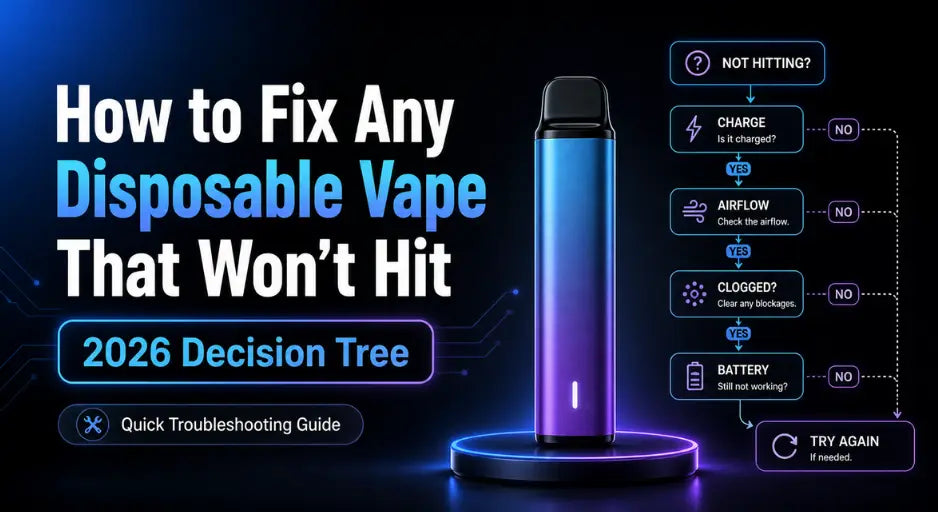
Quick answer: A disposable vape that won't hit traces to one of seven causes — clogged airflow, dead battery, air bubble blocking oil flow, flooded coil, cold-thickened e-liquid, blocked mouthpiece, or a closed airflow control ring. Most are fixable in under two minutes. Work the seven fixes below in order, from least to most invasive, before you replace the device.
Walk into any disposable vape that suddenly stops hitting and one of two things is happening: the device is genuinely at end of life, or one of seven minor mechanical issues is blocking a perfectly functional unit. The frustrating part is that they look identical from the outside. This guide is a decision tree — start at Step 1, work down, and within five minutes you will know whether the device is salvageable or it's time to grab a fresh one from the JellyPuffs disposable vape collection.
Every fix below is brand-agnostic. They work on Geek Bar Pulse, Lost Mary MT35K, NEXA Ultra II, Off-Stamp X-Cube, Foger Switch Pro, RAZ, Vozol — anything pre-filled and draw-activated. Brand-specific fixes are linked in the relevant sections.
Why your vape stopped hitting (the 7 root causes)
A disposable vape has three working parts: a battery, a coil wrapped in cotton wick, and an airpath that runs from the airflow vent at the bottom up through the coil and out the mouthpiece. When you draw, a sensor in the airpath fires the battery, the battery heats the coil, the coil vaporizes whatever the wick is holding, and that vapor exits the mouthpiece. Anything that disrupts that chain produces the same symptom: nothing on the inhale.
The seven root causes — ranked roughly from most to least common in community troubleshooting threads:
- Clogged airflow / stuck draw sensor — condensation, e-liquid film, or pocket lint in the airflow vent prevents the sensor from registering your inhale.
- Dead battery on a rechargeable model — the device drained during shipping or shelf storage, or you are simply due for a charge.
- Air bubble in the wick — e-liquid pooled at one end of the tank, leaving the wick dry where it contacts the coil.
- Flooded coil — too much e-liquid saturating the wick, drowning the heating element so it can't vaporize properly.
- Cold-thickened e-liquid — exposure to cold temperatures (car overnight, winter pocket) makes the juice too viscous to wick.
- Blocked mouthpiece — debris, condensation, or a foreign object lodged in the exit hole restricts vapor flow.
- Closed airflow control ring — on devices with adjustable airflow (Geek Bar Pulse X, Foger Switch Pro, NEXA Ultra II), the ring rotated shut in your pocket.
The seven-step fix below addresses every cause in the most efficient order — least invasive first, so you don't risk damaging a salvageable device by jumping to drastic measures.
The 7-step fix (in order)
Run these in sequence. Stop the moment the device hits normally. Don't skip steps even if you think you know the cause — Step 1 takes ten seconds and resolves the majority of cases.
Blow firmly into the airflow vent
Fixes: clogged airpath, stuck draw sensor (the single most common cause).
Locate the airflow vent — usually one or two slots at the bottom of the device, sometimes hidden behind the airflow ring. Blow firmly through that vent for three to five seconds. You should hear a faint gurgle or feel air pass through. Wipe any liquid that exits with a tissue. Take a draw. If it still won't fire, blow gently into the mouthpiece for two seconds, then try again.
Plug it in for 15 minutes
Fixes: dead battery on a rechargeable model.
If your device has a USB-C port, connect it to a phone charger or computer. Most devices show a charging indicator — solid LED, animated screen, or a percentage display. Wait at least 15 minutes before testing, even if the indicator suggests it's "charged" sooner. Some controllers will not fire until the cell crosses a minimum voltage threshold. Brand-specific charging issues? See our Foger charging guide and Geek Bar Pulse troubleshooting guide.
Tap the device firmly on a hard surface
Fixes: trapped air bubble preventing the wick from saturating.
Hold the device upright (mouthpiece up). Tap the bottom firmly against a flat hard surface — a table, your palm, a hardcover book — three to five times. The goal is to break a vacuum bubble and let e-liquid flow back to the coil. If the device has a transparent tank, you may see the bubble move. Wait 30 seconds for the wick to re-saturate, then try a soft draw.
Warm the device in your palms for 60 seconds
Fixes: cold-thickened e-liquid that can't wick to the coil.
Skip this step if the device has been at room temperature for more than an hour. Otherwise, hold it in both hands for 60 to 90 seconds. Body heat thins the e-liquid enough for the wick to saturate normally. This is one of the most common winter problems — devices left in cold cars, cold pockets, or near windows all show the same "won't hit" symptom that resolves the moment they warm up.
Check the airflow control ring
Fixes: rotated-closed airflow ring on devices that have one.
If you're using a device with adjustable airflow — Geek Bar Pulse X, Geek Bar CLR, Foger Switch Pro, NEXA Ultra II, Off-Stamp X-Cube, Lost Mary Nera Fullview, RAZ Vue — find the airflow ring (usually at the bottom or side of the device) and confirm it's open. If it rotated closed in your pocket, the device receives no air on the draw and the sensor never fires. Open the ring fully, then take a test draw.
Clean the mouthpiece
Fixes: blocked mouthpiece restricting vapor exit.
Use a toothpick, paperclip, or dry cotton swab. Gently insert into the mouthpiece hole and rotate to dislodge any visible debris, condensation, or e-liquid film. Wipe the mouthpiece clean with a dry tissue. Don't use water or alcohol — both can seep into the airpath and short the sensor. Take a slow draw and check whether vapor production has returned.
Cover one airhole and pull slowly
Fixes: stubborn clogs that survived Step 1; flooded coil.
Many disposable vapes have two airflow holes. Place a finger over one of them. Take a slow, steady draw on the mouthpiece — not a hard puff. The increased pressure across the single open hole creates enough suction to clear residual obstruction without flooding the coil further. If e-liquid hits your tongue at this point, the coil was flooded; let the device rest mouthpiece-up for two to three minutes, then try a normal draw.
If the device still won't hit after Step 7, the issue is no longer mechanical. The next two sections cover what to check before you replace it.
Blink pattern decoder
If the LED on your device is blinking instead of staying solid when you draw, the controller is signaling a specific fault. Patterns are roughly standardized across major brands — Geek Bar, Lost Mary, NEXA, Foger, RAZ, Off-Stamp — but always check your device's documentation if anything looks unusual. Here are the patterns that show up most often:
| Pattern | What it means |
|---|---|
| Solid LED while drawing | Normal operation. Device is firing correctly. |
| 3 blinks on draw | Low battery. Plug in via USB-C if rechargeable; replace if non-rechargeable. |
| 5 blinks on draw | Puff time exceeded. You held the draw past the safety cutoff (usually 8–10 seconds). Take shorter puffs. |
| 10+ rapid blinks | Short circuit detected. Often caused by moisture, drop damage, or a manufacturing defect. Stop using the device. |
| LED flashes on its own (auto-firing) | Stuck draw sensor or moisture in the airpath. Tap firmly, blow into the airflow vent. If it persists, stop using the device — auto-firing is a fire risk. |
| LED won't turn on at all | Battery is fully drained or the device is dead. Try Step 2 (charge for 15 minutes). If still nothing, the device is at end of life or defective. |
When it's a fake or a defective unit
The FDA estimates that over half of disposable vapes sold in the US in 2025 were counterfeit. Counterfeit devices are a major reason a "new" vape won't hit out of the box — they use rejected batteries, mismatched coils, and inconsistent e-liquid that may not wick correctly. If a brand-new device fails Steps 1 through 7, run our 5 Signs Your Disposable Vape Is Fake checklist before doing anything else.
Things to verify in under two minutes:
- Authenticity code — every legitimate brand prints a QR code or scratch-off code on the box. Scan it on the brand's official site (not a link from the box itself, which can be spoofed). A genuine code returns "Authentic" once. "Already verified" or any error means the device is counterfeit.
- Packaging quality — blurred fonts, double-printed text, misspelled brand names, or missing nicotine warnings indicate a counterfeit.
- Build quality — loose components, rattling sounds, mismatched seams, or a battery that runs hot during normal use.
If the device appears authentic but still won't fire, it's a defective unit. Genuine retailers honor DOA (dead on arrival) replacements within a reasonable window — contact the seller before disposing of it. Don't crack the device open or attempt to refill it; both void the warranty and can damage the lithium-ion battery.
When the device is genuinely dead
If you've worked the seven-step fix and verified the device is authentic, the most likely explanation is that it has reached end of life. Modern disposables are designed so the battery and the e-liquid run out at roughly the same time — the controller cuts power before the wick goes fully dry, which is why a device can feel like it has juice left even though it won't fire.
Signs of genuine end of life:
- Vapor output dropped noticeably over the last day of use
- Flavor became muted, then took on a faint plastic or burnt note (see why some vape flavors taste burnt for the full breakdown)
- You're past 80% of the rated puff count based on how long you've owned the device
- The screen shows zero or near-zero on the e-liquid indicator
- The battery indicator was already low before the device stopped firing
At this point, dispose of the device responsibly. Lithium-ion batteries should never go in standard household trash — they're a fire risk in waste trucks and landfills. Most Texas counties run household hazardous waste collection events; in Houston, the Westpark Consumer Recycling Center accepts disposable vapes year-round. The EPA also recommends taking spent devices to any retailer that runs a battery recycling program.
Prevent this next time
Most "won't hit" issues are preventable with how you store and use the device:
- Store upright when not in use. Sideways storage lets e-liquid pool away from the coil, which causes the wick-bubble issue in Step 3.
- Keep it at room temperature. Don't leave a device in a hot car or a cold pocket. Heat thins e-liquid (causes leaking); cold thickens it (causes Step 4's no-wick problem).
- Avoid chain vaping. Back-to-back puffs flood the coil and shorten its life. Wait 10–15 seconds between draws to let the wick re-saturate.
- Keep the airflow vent clean. Pocket lint, fabric fibers, and condensation are the single biggest cause of clogged airflow. A monthly wipe with a dry cloth solves it.
- Charge correctly. Use the included USB-C cable or any standard 5V/1A phone charger. Avoid fast-charge bricks rated above 2A, which can stress the small batteries used in disposables.
- Buy from verified retailers. Counterfeit devices are roughly twice as likely to fail out of the box. Stick to sellers that source from authorized distributors.
Choosing the right nicotine strength also matters — too high a strength on a low-power device leads to over-puffing, which strains the coil. Our 5% vs 3% vs 0% nicotine guide covers how to match strength to your usage pattern.
Frequently asked questions
Why is my brand-new disposable vape not hitting straight out of the box?
Three common reasons: the battery drained during shipping or shelf storage (charge for 15 minutes if rechargeable), the airflow sensor is blocked by manufacturing residue (Step 1 fix), or the device is counterfeit. Run Steps 1, 2, and the authenticity check in that order before contacting the retailer for a replacement.
Can I revive a disposable vape if the LED won't even turn on?
If the device has a USB-C port, plug it in for 15 minutes — many controllers won't show a charging indicator until the cell crosses a minimum voltage threshold. If the device has no charging port and the LED won't fire after Steps 1, 3, and 7, the lithium cell is fully depleted and there's no path to recovery. Recycle it.
Why does my vape work for one puff and then stop?
Almost always a flooded coil. Excess e-liquid saturates the wick, gets vaporized on the first puff, and then the controller cuts off because the coil can't heat through the saturation. Hold the device mouthpiece-up for two to three minutes to let gravity drain the excess back into the tank, then try a slow draw.
How long should I blow into the airflow vent?
Three to five seconds is enough. Blowing longer or harder can push e-liquid into the airpath chamber and make the problem worse. If one round of three to five seconds doesn't work, wait 30 seconds, wipe any liquid that exited, and try one more time before moving to Step 2.
Can I refill a disposable vape that's run out of juice?
Disposables are designed as sealed single-use devices. Cracking them open to refill voids any warranty, risks puncturing the lithium-ion battery, and exposes you to concentrated nicotine. If you want a refillable experience without the disposable cost, switch to a detachable-battery system — Foger Switch Pro, Off-Stamp X-Cube, RAZ Vue, and Lost Mary Nera Fullview all use a reusable base with replaceable prefilled pods.
Is it safe to keep using a vape that auto-fires (LED flashing on its own)?
No. Auto-firing means the draw sensor is stuck closed, which keeps the coil heating without your input. Continued use overheats the battery and creates a fire risk in pockets and bags. Try tapping the device firmly and blowing into the airflow vent once. If the auto-firing persists, dispose of the device at a battery recycling drop-off — don't put it in regular trash.
Why did my vape stop hitting right after a flight?
Cabin-pressure changes can force e-liquid into the airpath, flooding the sensor or the coil. Hold the device mouthpiece-up for several minutes, then run Steps 1 and 7. If the device leaked during the flight, see our TSA disposable vape guide for packing tips that prevent it next trip.
My vape works on the first puff after sitting overnight, then quits. Why?
The wick re-saturated during the rest period, which gives one good puff, but the underlying issue — a hairline coil crack, a partially failed sensor, or a battery near end of life — kicks in immediately after. The device is in its final stretch. Use what's left, but plan a replacement.
Where to buy a replacement
If your device is genuinely at end of life, JellyPuffs ships authentic disposable vapes from our Houston, Texas warehouse within 12 hours. Every device sold is sourced directly from authorized distributors with verified authenticity codes — never from gray-market resellers. Free shipping on orders over $99.99.
Sources
- U.S. Food & Drug Administration — Tips to help avoid vape battery fires or explosions
- U.S. Environmental Protection Agency — How to safely dispose of e-cigarettes
- Vaping360 — How to fix any disposable vape that isn't working
- Vaping360 — A blinking disposable vape: what it means and how to fix it
- JellyPuffs — 5 Signs Your Disposable Vape Is Fake
- JellyPuffs — Geek Bar Pulse troubleshooting guide
- JellyPuffs — How to charge Foger Vape safely and properly
- JellyPuffs — Why some vape flavors taste burnt


